Now available on the Mac App Store: TypeIt4Me 7.1

The weekend is so close…so very close, we can almost touch it. As ever, TypeIt4Me has kept us busy this past month. In addition to implementing some much-requested new features, we’ve made further progress on whittling down The List of Reported Annoyances. With the font size set to 8 and the display in portrait orientation, this wince-inducing catalogue of failures is now almost short enough to view at a glance without scrolling. How about that? Anyway, if you head over to the Mac App Store you’ll see that TypeIt4Me 7.1 is now available to download. Read on for an overview of what you can expect from this latest update.

What’s New and Improved in TypeIt4Me 7.1 (203):

Added features:
  • By popular request, there’s a new setting to stop the main TypeIt4Me window opening on launch.
  • “New Predefined Set” has been added to the TypeIt4Me menu, for increased discoverability.
  • There are several new predefined date formats to choose from when inserting a dynamic date in a snippet.
  • When the “Show in Menu Bar” app icon setting is selected, you can now choose whether the TypeIt4Me icon should also show temporarily in the Dock while the main app window is open.
Bug fixes:
  • Fixed a bug that would add an unwanted carriage return after expanding a prompt snippet.
  • When TypeIt4Me is in the Dock but the window is closed, clicking the Dock icon now opens the window.
  • Fixed a bug that would cause the TypeIt4Me icon to reappear in the Dock despite “Don’t Show App Icon” being selected in Settings.
  • Fixed a bug that could prevent adding multiple fill-in options / prompts to a rich formatted snippet.
  • All options in the View menu for sorting snippets now work correctly and the sort order for each set is reflected in the point-and-click menu.
  • Fixed a bug that would sometimes cause the snippet formatting popover menu to close immediately when opened.
  • Improved compatibility with WhatsApp.
  • Fixed a bug affecting nested snippets that contain rich formatting and / or pictures. Formatting and pictures are now correctly retained on expansion.
  • The position cursor special function now works correctly in rich formatted snippets.
  • Fixed a bug where abbreviations would remain when expanding snippets in File > Save dialogs.
  • Fixed a bug that struck when TypeIt4Me was set to show only in the Dock and the window was closed. Selecting “New Set” or “New Snippet” from the menu now opens the main TypeIt4Me window.
  • When you delete a snippet while in “Show duplicates” view it no longer reverts to showing the full snippet list, so you can continue to view, edit and delete duplicates.
  • Fixed a bug where the wrong fill-in option / prompt would be renamed when saving changes if more than one fill-in option / prompt with the same name was present in the snippet.
  • Fixed bugs that would result in the wrong popover preview content sometimes being shown. This could happen when quickly moving the pointer over adjacent fill-in options / prompts in a rich formatted snippet.
  • When adding a “Don’t expand in” or “Only expand in” rule to a set, Safari now correctly appears in the list of apps you can apply the rule to.

…Phew.

This one turned out to be quite a substantial update. Thanks again to everyone who has been in touch to suggest new features and / or to make us aware of stuff that’s not working as expected. Together, we’ll whip this app into shape yet.

TypeIt4Me 7.0.2 has arrived. It brings bug fixes and performance improvements galore.

Thursday! What a concept. After weeks of hard graft spent sweating our way through Operation Midnight Ham Sandwich Operation Bug Spray we can at last announce that TypeIt4Me 7.0.2 is available to download. Coming hot on the heels of last month’s update, this one contains a veritable cornucopia of bug fixes. You should also find that it’s generally more robust, performance-wise.

Release notes for TypeIt4Me 7.0.2 (171):

  • Fixed more bugs that could cause CSV import problems. Also added support for a third column, for those who wish to import labels along with abbreviations and snippet content.
  • Fixed a bug affecting German keyboards that would prevent expansion of abbreviations containing these characters: ^ ° ` ´ §
  • The “All punctuation resets abbreviation” option in Expansion settings was not working correctly. Now it does.
  • Fixed a bug that would cause problems attempting to save changes to snippets containing emoji.
  • After you type something in the search filter above the snippet list, it’s now correctly cleared when you switch to another set.
  • Fixed a bug that broke Pause / Resume in the TypeIt4Me menu.
  • After selecting a file in Finder and pressing the Enter key to rename it, expansion now works as expected.
  • Fixed a bug that would leave the first letter of an abbreviation behind after expanding a snippet in the Chrome URL bar.
  • Usage metadata and statistics now update correctly for rich formatted snippets that contain dates and / or special TABs
  • Fixed: the Add a Snippet window now correctly displays a warning again when you attempt to define an abbreviation that already exists. It once again gives the option to create a duplicate or overwrite the existing snippet.
  • Fixed a bug in the text formatting popover menu that could cause the SF symbols on text alignment and hyperlink buttons to display as question marks.
  • Rich snippets with abbreviations that involve holding the shift key or that begin with 2 numbers or more no longer expand in Unwanted Title Case.
  • The app now prevents attempts to combine special function characters (e.g. ⌫⇥⇤⏎␊↓↑←→⎢) in a snippet with fill-in field options and / or pulldown menu prompts. Mixing these is not supported.
  • The “Add a Snippet” window now does a better job of preserving rich formatting attributes when you select text and invoke it.
  • Improved support for formatting and saving non-latin alphabet characters.
  • Attempting to expand a snippet that contains an empty autocue placeholder no longer results in a crash.
  • Fixed a bug that could cause a square symbol to be appended to the end of expanded snippets when using the esc key as a trigger.
  • Numerous stability and performance improvements.

Once again, many thanks for your patience. There are of course further bugs still on our list of things to fix, as well as a number of requested features to add. We hope to be able to submit the next build to Apple for review in a couple of weeks.

The TypeIt4Me 7.0.1 bug fix update is now available on the Mac App Store

Phew! It’s with great relief that we’re able to report the promised TypeIt4Me 7.0.1 bug fix update is at last available to download. We were growing a bit apprehensive: despite no major changes, it took nearly 3 weeks and 3 submissions for this update to get the nod from Apple’s review engineers.

In contrast, the initial 7.0 launch build was approved for release on the Mac App Store within hours of submission. We got there in the end, though and that’s what matters. It’s reassuring to know that Apple is vigilant when it comes to protecting its customers.

These are the release notes for TypeIt4Me 7.0.1 (143):
  • Adding a word to ignore in AutoCorrect settings works as expected (no more crashes)
  • The “starting with a capital” checkbox in AutoCorrect “ignore” settings is selectable again
  • We fixed an issue where dragging a CSV file into the sidebar would not convert it correctly
  • The AM / PM option in the “Add a time” menu works again
  • The snippet list column now displays correct previews for snippets that contain a mixture of both dates and prompts
  • Dates now correctly expand in the default system language when no language has been specified
  • Stats and metadata now update correctly after expansion for snippets that contain prompts
  • Date snippets in search window results no longer need to be clicked twice to be inserted
  • This build now correctly prevents unsupported mixing of autocue placeholders and input field prompts in the same snippet
  • Turning off accessibility permission while the app is running no longer causes lock-ups (it’s still best to quit the app before removing its permission altogether, though)
  • This build corrects some minor localization omissions

Thank you for your patience. There are still more bugs that we are working to fix and we’re aiming to submit the next build for review in a week or so. Hopefully, future TypeIt4Me bug fix updates will go smoothly from this point on. We think we have a better grasp of reviewers’ chief concerns and how to address these up front.

Update: TypeIt4Me 7 Flash Sale Extended to May 31st

A screenshot of the main TypeIt4Me window with a date snippet showing. The date reads May 31, 2025.

Good morning / afternoon / evening! (delete as appropriate)

Those of you with a keen eye will have noticed that TypeIt4Me 7 is still available to purchase at the low price of £9.99 / 9,99€ / $9.99 (USD.) This despite our initial announcement indicating that the flash sale would end on May 1st. How come? The reason is we are soft touches, with all the business acumen of a bowl of gnocchi. There are many of you out there who were very distraught at having missed the deadline, so we’ve restarted the sale and extended it to the end of May.

The Best Laid Plans…

Our motives for reverting to the lower price are, in fact, twofold. First, it was brought to our attention that for reasons unknown (ahem) the discounted TypeIt4Me 7 launch sale price automatically ended a few hours too soon in some time zones. In all likelihood, this was down to an oversight and/or input error due to being knackered. Haste, fatigue and sleep deprivation have a way of leading to slip-ups – especially, it would appear, when using Apple’s scheduling tools to co-ordinate automated regional price changes on the Mac App Store. So…apologies from London, England to everyone in remote Alaska, Hawaii and similarly exotic lands – we do still care about you.

Further to this administrative cock-up, in the hours immediately following the actual intended cutoff we woke up to a flurry of messages from latecomers who’d missed out on the deal, pleading for clemency. By the time we’d opened the 5th impassioned Puss-in-Boots email lobbying us for a teensy-weensy extension of the sale the realisation set in that we really hadn’t been generous enough. We were left feeling like downright grubby capitalists. So, we concluded the best remedial solution would be to start the flash sale up again and let it run for longer. If you thought you’d missed the boat, don’t despair: you now have an extra month to climb aboard. We want to give everyone a chance to get involved without raiding the piggy bank.

Upgrades? Sidegrades? Crossgrades? Alas, the Mac App Store is Built Different.

On a related matter, another question that’s come up a lot concerns upgrades. Many have asked us if it is or will be possible to upgrade to TypeIt4Me version 7 at a special discounted price just for existing customers. The answer is no…and while we have your attention we’d like to take this opportunity to explain the situation. In short: to free ourselves from the extra admin that direct sale involves, we made TypeIt4Me 7 available only on the Mac App Store – and regrettably, upgrade pricing is not an option there.

When we sold a licence-based version of TypeIt4Me directly through our website, we were able to operate a generous upgrade discount policy. It was often a headache for us to manage, but anyone in our database could update to the latest major version for under a tenner, no matter how long ago they last paid for TypeIt4Me. This would stretch back decades to much older versions, in some cases.

For better or worse (OK, worse), that’s not possible on the Mac App Store, which is an outlet owned and operated by Apple, the new, exclusive vendor of TypeIt4Me. Apple doesn’t share customer details with us and also doesn’t know who has previously paid us directly in the past for a different version. There is no mechanism provided to us to offer selective discounts to customers who fall into this category, so…

…Discounts for Everyone!

With those considerations in mind we decided to take a hit to our bottom line and offer a hefty, flat discount to everyone when our major new update launched. This was the simplest way we could think of to give existing users of older versions a window to update to version 7 without paying full whack again.

It’s clear now the biggest flaw in this plan was our failure to take into account that not everyone pays attention to our business. Most people of sound mind have better things to do with their time than scour their Junk folders for comically inept marketing emails from us. It’s likely they also don’t obsessively refresh this blog at regular intervals looking for bargains. That’s why we’ve extended the flash sale for a whole month: to give everyone a fair chance to notice TypeIt4Me 7 is out now and get up to speed.

Slipped Between the Cracks? Get in Touch!

Did you pay more than £9.99 / 9,99€ / $9.99 (USD) for TypeIt4Me yesterday? Don’t worry, we’ve got you. Anyone who purchased TypeIt4Me 7 during the brief period yesterday (May 1st) when it reverted to full price is welcome to contact us for compensation. If you forward us your receipt from Apple, we will happily issue you with a redeemable App Store gift card to cover the difference in price.

That’s all we have to share with you for now. We’ll come back to you soon once we have news on the TypeIt4Me 7.0.1 bug fix update. At the time of writing, this is currently still lost in the Bermuda Triangle of Apple’s App Store review process, awaiting approval. We are unable to release it until Apple gives us the green light. Thanks for bearing with us while we attempt to move things along and get the update into the Mac App Store to fix issues you’ve reported.

A TypeIt4Me 7.0.1 update is already on the way

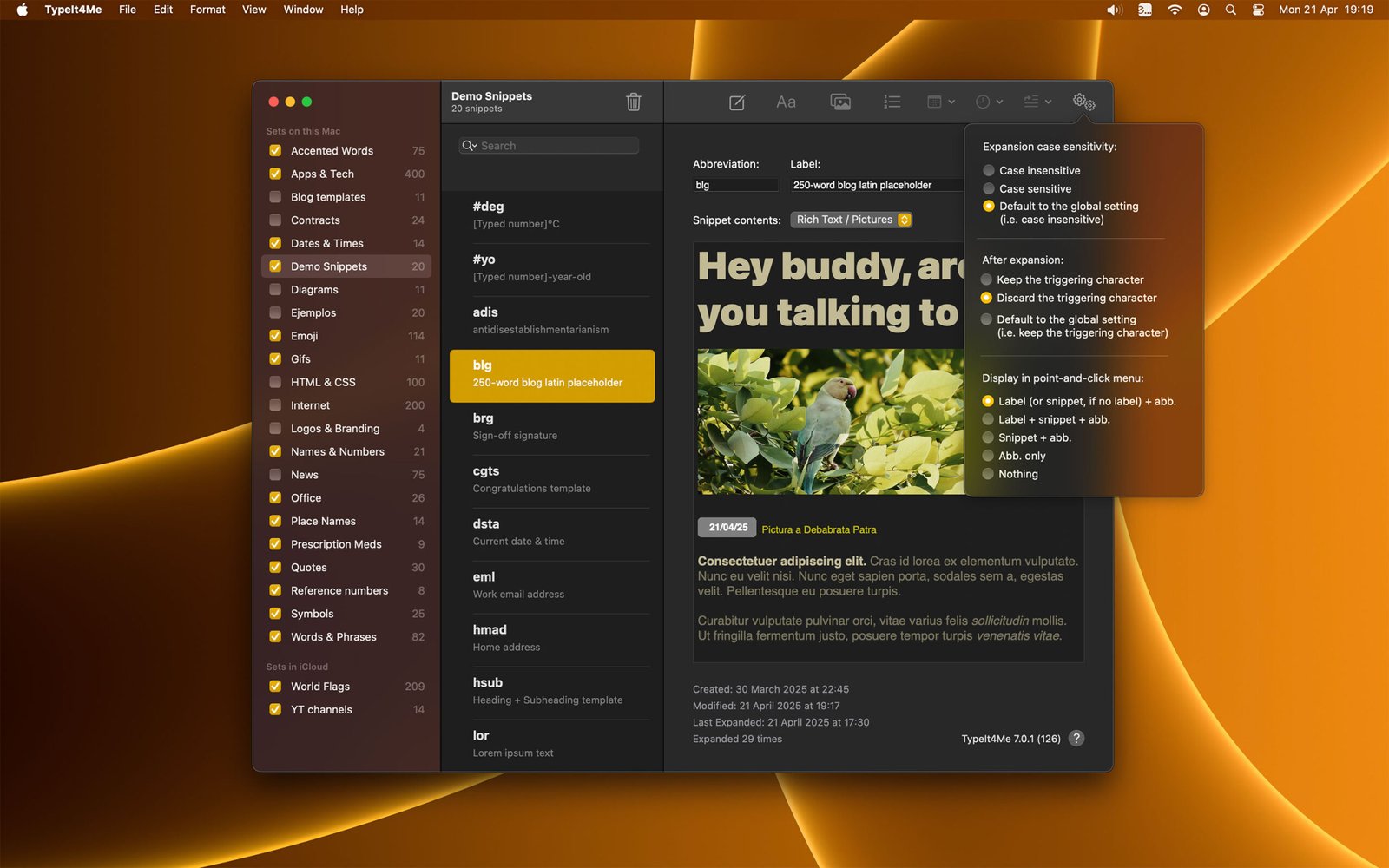
A screenshot of the main TypeIt4Me app window in dark mode, with the snippet settings menu open

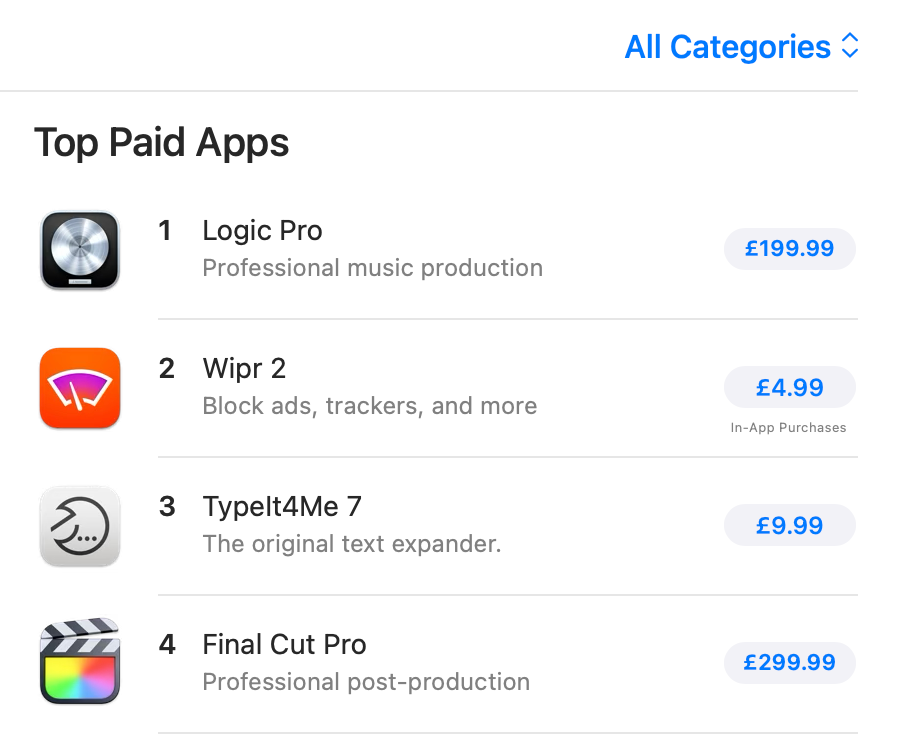
A screenshot of TypeIt4Me 7 occupying the #3 spot in the Mac App Store Top Paid Apps chartHey there!

First things first: THANK YOU and yes, we have seen your messages. We will endeavour to reply as soon as humanly possible. We’ve now reached the point of sleep deprivation at which the act of closing our eyes briefly results in a kaleidoscopic vortex of coloured lights not dissimilar to the stargate sequence from 2001: A Space Odyssey.

To our amazement, just a few days after release TypeIt4Me 7 is sitting prominently in the Apps We Love Right Now section of the Mac App Store. 

Both of us are overjoyed and reeling from the enthusiastic response our latest offering has received. We hadn’t anticipated that TypeIt4Me 7 would immediately catapult straight to No.1 in the Mac App Store Productivity category. At the time of writing, it’s also at No.3 in the Top Paid Apps chart for all categories – just edging out Apple’s own Final Cut Pro.

We have a sheepish confession to make. After toiling in relative obscurity for the last few decades, the level of attention this has generated is not something we were fully prepared for.

To paraphrase the old saying, everyone has a plan until they get hit in the face with a Large Influx of expectant new customers. What feels like a near 100-fold increase in daily sales almost overnight means we’re receiving a higher volume of email than usual.

The cavalry is coming

As expected, a number of previously undiscovered glitches have come to light since release day. The good news is we have already fixed several of the bugs that have been reported to us in the last week. We submitted the first maintenance update to Apple a couple of days ago and once this new 7.0.1 build is approved (knock on wood) it will resolve a number of issues present in the initial release. 

Thank you for your patience, in the meantime. We do appreciate that the wait can be frustrating. For some reason we can’t fathom, the review process is taking longer than it did when TypeIt4Me 7 was approved for release on the Mac App Store previously. Our working hypothesis is that the app’s sudden high profile on the store means Apple’s review engineers are subjecting it to greater scrutiny this time. Hopefully, it’ll get the green light in the next day or two and then you won’t have any more problems with importing CSV files, composing custom timestamp snippets or configuring AutoCorrect settings.

Next up…

There are further items on our list of things to communicate to everyone, but by necessity some of these have been placed on the back burner for now. Today we are turning our attention back to contacting our existing customer base directly to make them aware of the new version before the flash sale ends. We want to ensure everyone has an opportunity to grab a bargain. Additionally, anyone who purchased a licence for TypeIt4Me 6 in the last 3 months will soon be receiving a gift redeem code for the new version (if they haven’t already.)

To recap: we are immensely grateful to you all, a bug fix update is on the way and things are a little bit hectic at ES headquarters right now. We expect to get everything back on an even keel very soon, once we’ve absorbed the shock and got some decent shut-eye. In the meantime, if you’ve just installed TypeIt4Me 7 and you’re wondering (for example) where your previously created snippets went, please take a look at the FAQ and the TypeIt4Me Help guide. These ought to get you up and running.

Thanks again, everyone. We’re really touched by the outpouring of support.